1.18 Agent Mode & More Targeted Adaptive Control (May 25, 2026)
Last updated About 1 month ago
With the release of version 1.18, we’re introducing Agent Mode to MAIA. To support this, we’ve further expanded the control options for MAIA’s functions and enhanced the server infrastructure. Here’s an overview of everything you need to know.
Version 1.18 takes MAIA to a new level: with greater depth, autonomy, and precision for complex tasks thanks to Agent Mode. With the expanded control options, you can now tailor MAIA even more precisely to your individual use case.
This release introduces four new features at once:
1️⃣ Agent Mode (Beta)
2️⃣ Smart Toggles
3️⃣ High Precision Mode in Chat
4️⃣ Increased Server Capacity
1️⃣ 🤖 Agent Mode (Beta)
Agent Mode is one of our biggest enhancements to date. Instead of generating an answer in a single step, MAIA now works in Agent Mode like an experienced engineer: She plans independently, researches across multiple knowledge sources, reviews interim results, and keeps searching until the answer is truly complete.
This makes all the difference, especially for complex tasks, such as when you:
🗂️ Need
all product types from an extensive product catalog 🔍 Want
to compare color codes or standards across a wide range of documents 🌐 Are researching competitors and want the results validated immediately
Agent Mode is currently labeled as “Beta.” The final, more niche use cases are being tested within this framework. Nevertheless, Agent Mode has been extensively tested and is reliable in all typical use cases. The Beta label is expected to be removed within the next few weeks.
We welcome specific feedback on Agent Mode so we can continue to improve it.
What this means for you:
✅ Autonomous, multi-step research across all available knowledge sources
✅ More comprehensive results for complex or extensive queries
✅ Enabled by default for all chats and document queries
2️⃣ ⚙️ Smart Toggles: Controls for all MAIA features
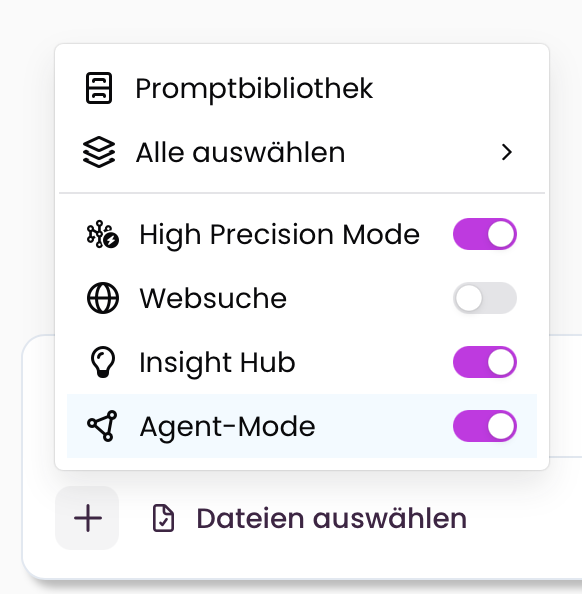
With Agent Mode, the importance of control options in MAIA is also growing. Using the toggles for High Precision Mode, Web Search, Insight Hub, and Agent Mode, you can precisely control the balance between quality, verification, and speed.
Real-world examples:
📋 Sales prep for a client meeting → all toggles on; MAIA verifies every piece of information and displays the source
✍️ Quick creative task like an email → HPM off; response comes faster without a validation loop
📁 Project overview from internal documents → Agent Mode + Insight Hub on, Web Search off
Our recommendation: Keep all toggles enabled in most cases.
What this means for you:
✅ Full control over quality and speed depending on the task and use case
✅ All toggles enabled by default
3️⃣ High Precision Mode now available even without selecting documents
Previously, High Precision Mode was only available in document mode. It’s now also available in regular chat. This means: MAIA double-verifies its answers—even for open-ended questions—using web sources and other knowledge sources.
What this means for you:
✅ Verified answers even without uploading a document
✅ Validation even during research, customer preparation, and knowledge queries
4️⃣⚡ Increased server capacity
In parallel with Agent Mode, we’ve migrated MAIA to a significantly more powerful server infrastructure. The result: noticeably shorter response times, especially for computationally intensive queries.
What this means for you:
✅ Faster responses across all use cases
✅ Better performance even with concurrent queries
🔧 Bug fixes
Minor stability and performance improvements
Questions or feedback? Feel free to reach out. We look forward to hearing about your experience with Release 1.18.