How MAIA handles conflicting information
Last updated About 1 year ago
Industrial document stacks always contain conflicting information - this is simply the reality of complex technical documentation. Different versions, updates, various contexts, and evolving specifications mean contradictory facts are the norm, not the exception. MAIA is built to work with this reality.
Default Behavior
MAIA searches your selected knowledge materials for relevant information, evaluates all the knowledge bits it finds, then synthesizes them into a coherent response:
Searches comprehensively across all selected documents for relevant information
Evaluates all knowledge bits rather than stopping at the first answer
Synthesizes information from multiple sources to give you a comprehensive response
Weighs information based on document recency, specificity, and context
Makes reasonable inferences when documents complement each other despite surface-level conflicts
Example: If Document A says "Maximum pressure: 300 bar" and Document B says "Operating pressure: 250 bar," MAIA understands these might refer to different specifications (maximum vs. operating) rather than being contradictory.
With High Precision Mode (HPM)
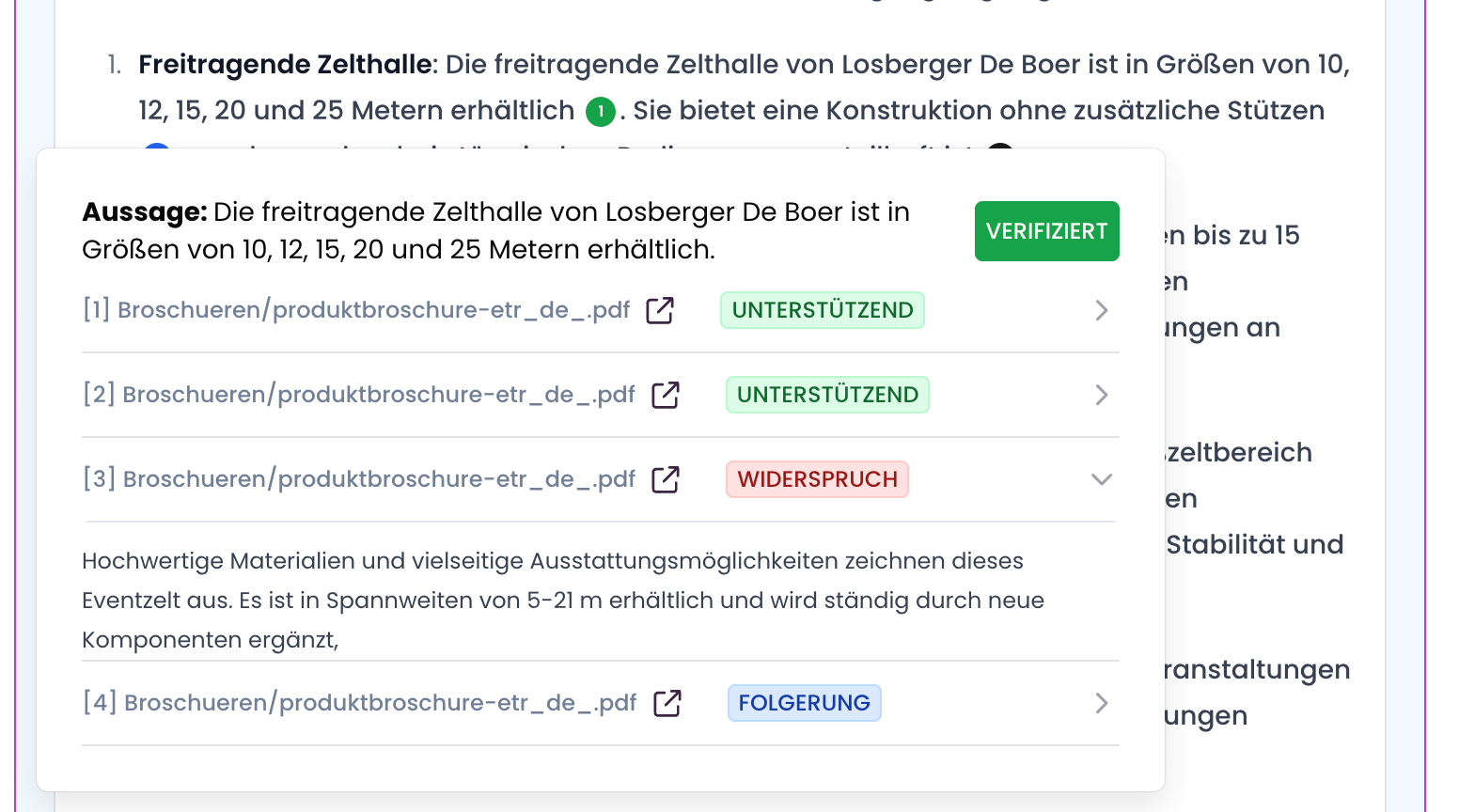
High Precision Mode acknowledges that sometimes you need absolute certainty. You can activate HPM in two ways:
1. Enable HPM globally in your settings for all queries 2. Layer HPM on specific questions by adding phrases like "verify this" or "double-check this information"
Think of HPM like calling a colleague just to be super sure you got something right. HPM provides radical transparency:
Flags contradictions directly: "Document A states X, but Document B indicates Y"
Provides exact source citations for conflicting information
Draws explicit conclusions about which information to trust and why
Shows you the reasoning behind its recommendations
Example with HPM: "According to the 2024 Technical Manual (page 15), the maximum pressure is 300 bar, but the 2023 Installation Guide (page 8) states 250 bar. Based on document dates, the 2024 specification of 300 bar appears to be the current standard."
Why This Approach
We built MAIA to reflect the reality of industrial document stacks: conflicting information is everywhere. Even published materials on company websites contain outdated specifications, different regional standards, or contextual variations.
Rather than pretending this complexity doesn't exist, MAIA works with it:
Acknowledges the messiness of real-world documentation
Helps you navigate conflicts rather than hiding them
Provides transparency when accuracy matters most
Conflicting information often reveals important insights - outdated documentation, different operating contexts, or genuine errors that need investigation.
When to Use Each Approach
Use Default Mode when:
Working with routine questions where synthesis is more valuable than granular detail
Need quick answers and trust MAIA's evaluation of source quality
Documents typically complement rather than contradict each other
Add "verify this" or enable HPM when:
Working with critical specifications where you need to see all conflicts
Double-checking information before making important decisions
Compliance or regulatory work where source attribution is essential
You have a gut feeling something might be inconsistent in your docs
The result: MAIA doesn't pretend your documentation is perfectly consistent - it works with the reality of industrial knowledge, giving you both quick synthesis and rigorous verification as your work requires.